The adoption of additive manufacturing technology in non-industrial settings has long been hindered by a significant barrier: mechanical complexity. Traditional 3D printer ownership often requires a working knowledge of kinematics, thermal dynamics, and material science. However, the evolution of the plug-and-play desktop FDM 3D printer represents a paradigm shift. By removing the need for assembly and calibration, manufacturers are transitioning 3D printing from a specialist hobby to a universally accessible tool.
This article explores the engineering principles that enable a “no assembly required” experience and why this translates to higher print success rates for end-users.
1. Pre-Calibrated Kinematics and Structural Integrity
The core challenge in shipping a pre-assembled printer lies in maintaining frame rigidity during transit. Unlike flat-pack furniture or DIY kits, a precision instrument cannot tolerate misalignment caused by shipping vibrations. To solve this, the internal chassis utilizes a kinematic coupling system and pre-tensioned linear rails.
Before leaving the factory, each unit undergoes a rigorous calibration protocol. The stepper motors are tuned to specific micro-stepping values, and the PID (Proportional-Integral-Derivative) settings for the hotend and heated bed are pre-configured. This ensures that the first print is identical in quality to the thousandth print, eliminating the “bed leveling anxiety” that plagues new users.
2. Real-Time Monitoring via Transparent Enclosure
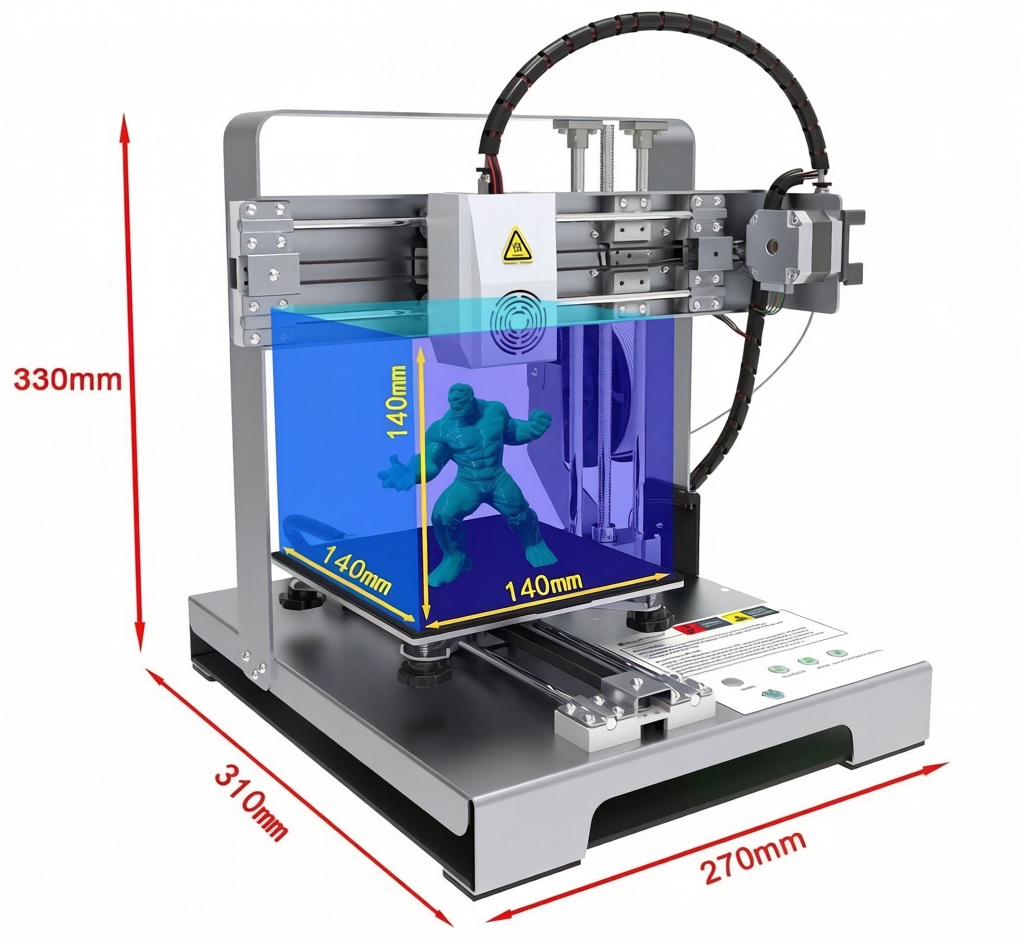
The transparent acrylic enclosure serves a critical function beyond aesthetics. It allows operators to visually monitor the first layer adhesion—the most critical phase of any print job. In a plug-and-play context, the enclosure is structurally integrated with the frame, providing additional torsional stiffness. This stability prevents “ringing” or “ghosting” artifacts on the printed model, ensuring that the output meets professional standards even in a home office environment.
3. Firmware Optimization and Error Handling
A plug-and-play experience is only possible with intelligent firmware. Modern systems incorporate thermal runaway protection and filament run-out sensors as standard. If the filament breaks or runs out, the machine automatically pauses, preventing hours of wasted printing time. Furthermore, the firmware includes pre-set profiles for various materials (PLA, PETG, TPU), removing the need for users to manually adjust retraction distances or flow rates.
Conclusion
The plug-and-play desktop 3D printer is not merely a convenience; it is a statement about the maturity of additive manufacturing technology. By pre-engineering stability, calibration, and error handling, these machines offer a near-certainty of success. For businesses and individuals who value time over tinkering, this represents the optimal intersection of technology and usability.
Frequently Asked Questions (FAQ)
Q1: Does “no assembly required” mean I never have to maintain the machine?
A: While no initial assembly is needed, periodic maintenance is still recommended. This includes cleaning the print bed with isopropyl alcohol and lubricating the linear rods every few months to ensure continued smooth operation.
Q2: How is the printer protected against damage during shipping?
A: The unit is secured within custom-molded EPE foam packaging that absorbs shock and prevents the gantry from shifting. Additionally, the firmware includes shipping locks that secure the print head during transit.
Q3: Can I still adjust the settings if I want more control?
A: Yes. While the machine comes with optimized defaults, advanced users can access the full settings menu via the touchscreen or connected software to fine-tune parameters like acceleration, jerk, and temperature.
Q4: What happens if the power goes out during a long print?
A: The printer is equipped with a power-loss recovery function. It saves the current print position to memory, and upon power restoration, it will prompt you to resume the print exactly where it left off.
Q5: Is the transparent cover removable for printing high-temperature materials?
A: Yes, the enclosure panels are typically held in place by thumbscrews or clips, allowing for easy removal if you need to print materials like ABS that require higher ambient temperatures or different ventilation setups.


No reply content